RFID vs QR Code vs Mobile App: Comparing Access Methods for Residential Buildings
Share
Choosing the right access method for your apartment building or gated community is a decision that affects security, convenience, cost, and resident satisfaction. RFID cards, QR codes, and mobile apps each have distinct strengths and weaknesses. This guide compares them side by side—so you can make an informed choice for your next project.
In modern residential buildings, access control has evolved far beyond a simple key or buzzer. Today’s residents expect convenience, security, and flexibility—whether they are entering the lobby, opening the parking gate, or letting in a delivery driver from across town.
Three access methods dominate the residential market: RFID cards, QR codes, and mobile apps. Each has its own advantages and trade-offs. The best choice depends on your building type, resident demographics, budget, and management capabilities.
This article breaks down each method—how it works, what it costs, where it excels, and where it falls short—so you can choose the right solution for your property.
Quick Comparison at a Glance
| Feature | RFID Card | QR Code | Mobile App |
|---|---|---|---|
| Credential Type | Physical card or fob | Digital code (printed or on screen) | Smartphone app |
| Best For | Daily use by all residents | Temporary visitors, deliveries | Tech-savvy residents, remote access |
| Security | Moderate – can be cloned if not encrypted | High – time-limited, single-use options | High – encrypted, biometric options |
| Convenience | High – tap and enter | Moderate – requires scanning | High – always on phone |
| Cost | Low (cards are inexpensive) | Very low (no hardware needed) | Moderate (app development/integration) |
| Management | Issue, revoke, replace cards | Generate, send, expire codes | Remote user management |
| Durability | Cards can be lost, damaged | No physical item | Phone can be lost, battery dies |
| Accessibility | Easy for elderly and children | Requires smartphone or printed code | Requires smartphone |
| Integration | Works with most readers | Requires camera/scanner | Requires network, app support |
1. RFID Cards: The Reliable Workhorse
RFID (Radio Frequency Identification) cards have been the standard for residential access control for decades. They are simple, reliable, and universally understood by residents of all ages.
How it works:
- A resident presents their card or fob to a reader at the door.
- The reader reads the unique ID and sends it to the controller.
- If the card is authorized, the door unlocks.
Key advantages:
- Simple and intuitive – no learning curve; tap and enter.
- Fast – access granted in milliseconds.
- Low cost – cards cost pennies; readers are affordable.
- Durable – cards and fobs last for years.
- Works offline – no network dependency for basic operation.
- Ideal for all ages – children and elderly residents can use them easily.
Key disadvantages:
- Can be lost or stolen – replacement is necessary.
- Cloning risk – older 125kHz cards can be cloned; 13.56MHz cards are more secure.
- No remote management – requires physical presence to issue or revoke.
- Not ideal for temporary access – issuing a card to a delivery driver is impractical.
Best for: Daily access for permanent residents, apartment buildings, gated communities, and any environment where simplicity and reliability are priorities.
2. QR Codes: The Flexible Visitor Solution
QR codes have emerged as a powerful tool for managing temporary access—especially for visitors, deliveries, and service providers.
How it works:
- A resident or property manager generates a QR code through an app or management platform.
- The QR code is sent to the visitor via email, SMS, or messaging app.
- The visitor presents the QR code to a scanner at the entrance.
- The system validates the code and unlocks the door.
Key advantages:
- Time-limited – codes can expire after a set period.
- Single-use – can be configured to work only once.
- No hardware for the visitor – just a smartphone or printed code.
- Easy to distribute – send via email, SMS, or WhatsApp.
- Low cost – no physical credentials to issue.
- Audit trail – track who used which code and when.
Key disadvantages:
- Requires a scanner – either a dedicated scanner or a camera-enabled intercom.
- Not ideal for daily use – less convenient than a card or app for residents.
- Dependent on phone battery – if the visitor’s phone dies, they cannot access.
- Privacy concerns – some visitors may not want to share personal information.
Best for: Temporary visitor access, deliveries, service providers, Airbnb guests, and any scenario where access needs to be granted remotely and expire automatically.
3. Mobile Apps: The Connected Resident Experience
Mobile app access is the newest and most feature-rich method. It leverages the smartphone that residents already carry, offering convenience, remote management, and integration with smart home systems.
How it works:
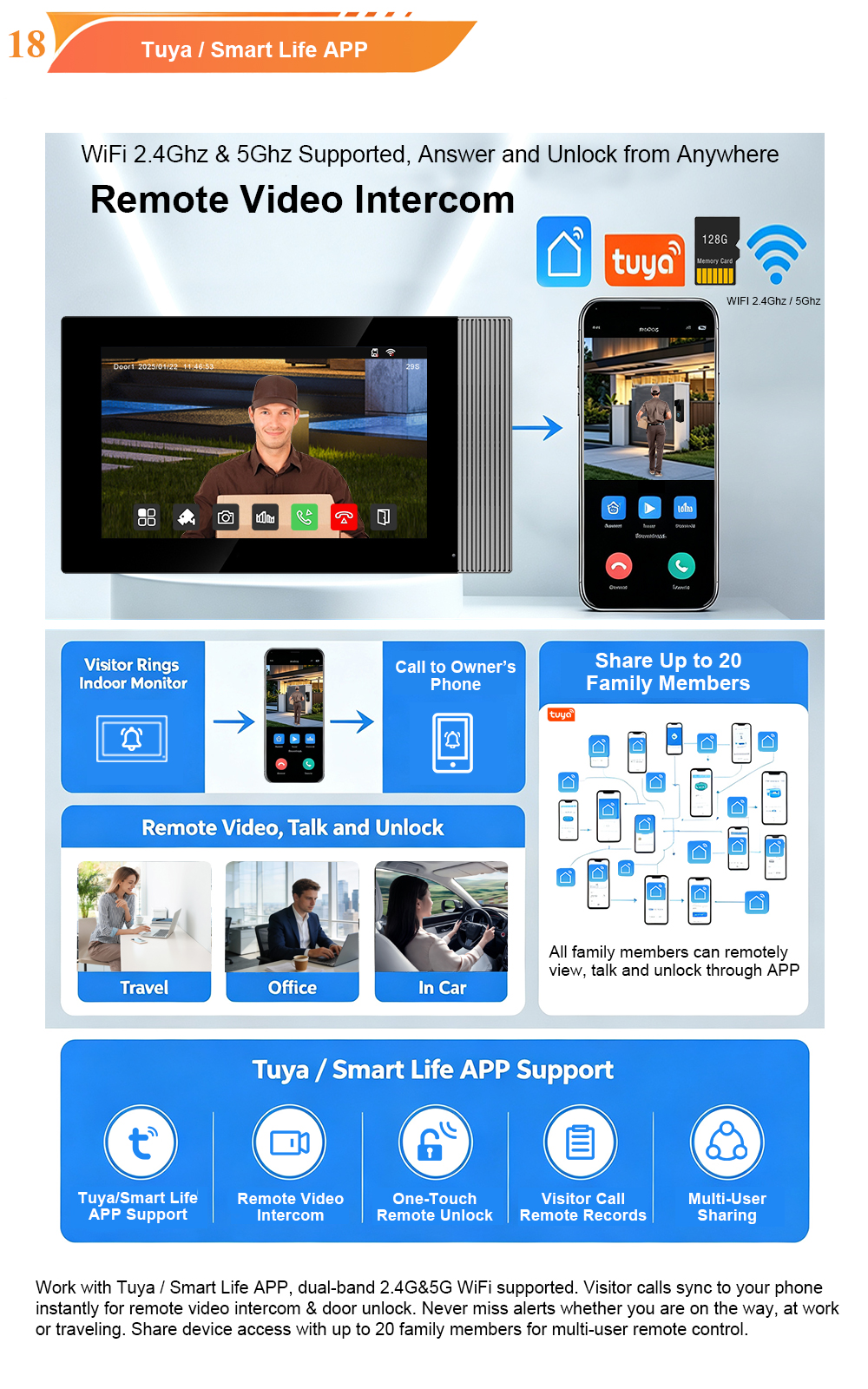
- The resident downloads the building’s app (e.g., Tuya Smart Life or a custom-branded app).
- They register their account and pair it with the access control system.
- When they approach the door, they tap “unlock” in the app or use NFC/BLE for hands-free entry.
- The app communicates with the system over the network to grant access.
Key advantages:
- Remote access – unlock doors from anywhere in the world.
- Visitor management – generate temporary codes or QR codes for guests.
- Integration – works with video intercom, smart home, and building management systems.
- Audit trail – detailed logs of who entered and when.
- Multi-factor authentication – can combine with biometrics or PIN for higher security.
- No physical credential – nothing to lose or forget.
Key disadvantages:
- Requires a smartphone – not suitable for residents without one.
- Battery dependency – if the phone dies, access is lost (unless backup methods exist).
- Network dependency – requires internet or local network connectivity.
- Higher setup cost – app development and system integration.
- Learning curve – some elderly or less tech-savvy residents may struggle.
Best for: Tech-savvy residents, remote access needs, integration with smart home systems, and buildings where convenience and advanced features are priorities.
Head-to-Head: Security, Convenience, and Cost
| Criteria | RFID Card | QR Code | Mobile App |
|---|---|---|---|
| Security | Moderate (cloning risk) | High (time-limited, single-use) | High (encrypted, multi-factor) |
| Convenience | High | Moderate | High (remote access) |
| Cost | Low | Very Low | Moderate |
| Management | Manual | Digital | Digital + Remote |
| Resident Experience | Simple, familiar | Good for visitors | Rich, connected |
| Best For | Daily resident access | Temporary visitor access | Remote & smart access |
The Hybrid Approach: Best of All Worlds
In practice, the most effective residential access control systems combine multiple methods. A typical hybrid setup might include:
- RFID cards for daily resident access – simple, fast, reliable.
- QR codes for visitor and delivery access – temporary, secure, easy to distribute.
- Mobile app for remote management and tech-savvy residents – convenience and control.
This approach ensures that every user—regardless of age, technical ability, or visitor status—has an appropriate and convenient way to enter.
FARHD’s video intercom systems support all three access methods:
- RFID/IC card readers built into outdoor stations.
- QR code scanning via camera-enabled intercoms.
- Mobile app integration with Tuya Smart Life for remote unlock and visitor management.
Which Method Should You Choose?
| If your priority is… | Choose… |
|---|---|
| Simplicity and reliability for all residents | RFID cards |
| Temporary visitor access with time limits | QR codes |
| Remote access and smart home integration | Mobile app |
| Comprehensive, future-proof solution | Hybrid (all three) |
Consider your resident demographics. A building with many elderly residents may prioritize RFID cards. A luxury tower with tech-savvy professionals may lean toward mobile app access. A building with frequent deliveries may need QR codes. Most buildings benefit from a combination.
How FARHD Supports All Access Methods
FARHD has been designing and manufacturing video intercom systems since 1998, with over 28 years of industry experience. Our systems are engineered to support RFID cards, QR codes, and mobile app access—all in one integrated platform.
Key features:
- RFID/IC card reader – built into outdoor stations, supports 13.56MHz and 125kHz.
- QR code scanning – via camera-enabled intercoms.
- Mobile app – Tuya Smart Life, supporting remote unlock, live view, and visitor management.
- Face recognition – optional, for hands-free access.
- Multi-language support – ready for global projects.
- OEM/ODM services – custom branding, packaging, and software.
- No MOQ for trial orders – start with a sample; scale as you grow.
Our products are trusted in over 90 countries, with more than 10,000 completed projects.
Conclusion: Choose the Right Mix for Your Building
There is no single “best” access method for every residential building. RFID cards excel at simplicity and reliability. QR codes shine for temporary visitor access. Mobile apps deliver remote convenience and smart integration. The ideal solution often combines all three.
FARHD’s video intercom systems support all three methods, giving you the flexibility to design an access control strategy that fits your residents, your budget, and your management capabilities.

About the Author: S & Y Internet Technology Inc.
S & Y Internet Technology Inc. is a professional installation and repair service provider based in Flushing, New York. Our expert team provides door-to-door installation and maintenance within a 100 km radius, ensuring quick response and high-quality results for every project — whether residential, commercial, or specialized.

Install & Repair Services
You May Also Interest
-
Tuya vs Smart Life: Which App Is Better for Your Video Door Phone?
A practical comparison to help you choose the right app for your smart intercom system If you’ve recently purchased a FARHD video door phone, you’ve probably noticed that the product documentation mentions two apps: Tuya Smart and Smart Life. This immediately raises a common question: which one should you actually use? Are they different? Does…
-
Touch Screen vs Non-Touch Video Intercom Monitors: Which Is Better for Residents?
When specifying a video intercom system for an apartment building, villa, or residential community, one question often divides decision-makers: should the indoor monitor have a touch screen or physical buttons? Both options have passionate advocates. Both have real advantages. And both can be the wrong choice if they don’t match the needs of the residents…
-
How to Upgrade an Old Apartment Intercom to IP Without Rewiring: Step-by-Step
Upgrading an old apartment intercom to a modern IP system no longer requires tearing down walls, replacing every cable, or disrupting residents for weeks. With the right retrofit technology, you can deliver full IP functionality—video calling, mobile access, remote management—using the existing 2-wire cabling already inside your building. This step-by-step guide shows you how. Many…
-
5 Common Mistakes to Avoid When Installing Apartment Video Intercom Systems
Installing a video intercom system in an apartment building is not the same as installing one in a single-family home. Multiple tenants, shared infrastructure, varying wiring conditions, and the need for scalability all create unique challenges. Too often, installers and property managers make avoidable mistakes that lead to poor performance, high maintenance costs, and unhappy…