Video Intercom for Mixed-Use Buildings: How to Manage Residential, Retail, and Office Access in One System
Share
- What Is a Mixed-Use Building?
- The Unique Access Control Challenges of Mixed-Use Properties
- How a Unified Video Intercom System Solves These Challenges
- Key Features to Look for in a Mixed-Use Video Intercom
- Real-World Examples: Mixed-Use Projects That Got It Right
- How to Choose the Right System for Your Mixed-Use Property
- Frequently Asked Questions
What Is a Mixed-Use Building?
A mixed-use building combines multiple functions—residential apartments, retail stores, commercial offices, and often hospitality or entertainment—within a single structure or development.
These properties are among the fastest-growing trends in real estate and access management. They range from high-rise towers with retail on the ground floor and apartments above, to sprawling developments like Bangkok’s ICONSIAM, which spans 750,000 square meters with luxury retail, residential towers, and riverside parks.
Mixed-use properties offer tremendous benefits—vibrant communities, convenient live-work-play environments, and higher property values. But they also present significant access control challenges.
The core challenge: How do you give retail customers access to shops, office workers access to their floors, residents access to their homes, and delivery drivers access to package rooms—all through a single, unified system—without compromising anyone’s security?
The Unique Access Control Challenges of Mixed-Use Properties
1. Multiple User Types with Different Needs
| User Type | Access Needs |
|---|---|
| Residents | 24/7 access to apartments, amenities, parking |
| Office workers | Business hours access to office floors |
| Retail staff | Scheduled access to retail spaces |
| Customers/shoppers | Public access to retail areas only |
| Visitors/guests | Time-bound access to specific residents |
| Couriers/deliveries | Short-term access to package rooms |
| Property management | Full building access for maintenance |
Each user type requires different permissions, different hours, and different authentication methods.
2. Varying Security Requirements
- Residential areas need high security and strict visitor verification
- Office areas need professional access management during business hours
- Retail spaces need public accessibility during operating hours—but controlled access after hours
- Common areas (lobbies, parking, amenities) need managed access for all
3. Stakeholder Coordination
Mixed-use projects involve multiple stakeholders—owners, residents, tenants, management companies, and visitors. Each has different priorities and expectations. As one industry analysis notes, “replacing the intercom system within a building requires a considerable amount of time and effort. Hence, evaluating costs from a long-term perspective is essential”.
4. Fragmented Systems
Too often, mixed-use buildings end up with separate systems for residential access, commercial access, and elevator control—creating disconnected silos of security information. As 2N notes, mixed-use projects “can be tricky as they combine both commercial and residential use cases in one premise”.
The problem with fragmentation: Separate systems mean separate management, separate credentials, separate maintenance contracts, and security gaps between them.
How a Unified Video Intercom System Solves These Challenges
A modern IP video intercom system brings all access points under one platform—providing a single, unified solution for the entire building.
1. Centralized Access Management
With a unified system, property managers can:
- Manage all credentials—residents, staff, tenants, visitors—from one dashboard
- Set time-based permissions—retail staff get access during business hours; office workers get floor-specific access
- Grant temporary credentials—delivery drivers get one-time or time-limited QR codes
- Revoke access instantly—when a tenant moves out or an employee leaves
- Review complete audit trails—know who entered, when, and where they went
“A video intercom with motion detection combines visitor management, access control, and entrance monitoring into a single system, reducing vendor sprawl and operational complexity”.
2. Smart Directory Management
Mixed-use buildings often have large, complex directories. Traditional button-based panels struggle to accommodate hundreds of names. Touchscreen intercoms solve this.
2N notes that touchscreen intercoms can “split the contacts into two sections, display company names, and more”. This means:
- Residential tenants appear in one section
- Commercial tenants appear in another section with business names
- Visitors can easily find who they’re looking for
DoorBird’s D31x series manages up to 1,000 entries in its digital name directory. Updates are made “remotely via app or web browser… resident changes or temporary permissions can therefore be implemented without on-site intervention”.
3. Multiple Access Methods for Different User Types
A unified system supports multiple authentication methods in a single platform:
| Access Method | Best For |
|---|---|
| Mobile app / Bluetooth | Residents, office workers—frictionless daily access |
| RFID cards / key fobs | Staff, frequent visitors |
| PIN codes | Retail staff, contractors |
| QR codes | Temporary guests, delivery drivers |
| Facial recognition | High-security residential areas |
| Video call | Traditional intercom users |
The Akuvox S535, for example, supports facial recognition, RFID cards, QR code access, Bluetooth mobile credentials, and PIN authentication in a single platform. This flexibility “improves convenience while enhancing site security and visitor management”.
4. Seamless Elevator Integration
In high-rise mixed-use buildings, controlling where people go after entering the lobby is just as important as controlling who enters.
Modern video intercoms integrate with elevator control systems to:
- Restrict visitors to authorized floors only
- Allow residents to call elevators from their apartments
- Enable office workers to access only their office floors
- Send the elevator to the lobby when a visitor is granted access
2N offers comprehensive elevator control with its Access Unit in the lift cabin, providing “authorized access to specific floors, while some floors may remain accessible to all without the need for authorization”.
5. Vehicle and Parking Access
Mixed-use properties often include parking garages serving residents, office workers, and retail customers.
Unified systems can handle vehicle access through:
- Bluetooth access readers for regular users
- License plate verification using smart video intercoms with cameras
- QR codes for temporary parking access
6. Front Desk and Reception Integration
Many mixed-use buildings have front desk or reception staff who manage visitor interactions.
Modern IP intercoms allow receptionists to:
- Answer calls from entrance intercoms using IP phones
- Verify visitors via video before connecting them to residents
- Transfer calls to residents after verification
As Aiphone describes: “When visitors called from an entrance station to a guard station, a staff member verified the purpose and, upon approval, used the transfer function to connect the visitor directly with the resident for communication”.
7. Package Room Integration
Package delivery is a major operational challenge in mixed-use buildings. Unified intercom systems can extend their technology to package rooms:
- Couriers access the package room using delivery-specific credentials (QR codes, PINs)
- Deliveries are recorded automatically
- Residents receive real-time notifications when a package arrives
ButterflyMX, for example, extends “its video intercom technology to package rooms to improve delivery security and organization. Couriers can access the package room, record deliveries, and notify residents automatically”.
Key Features to Look for in a Mixed-Use Video Intercom
Real-World Examples: Mixed-Use Projects That Got It Right
Case Study 1: Quartier Brucklyn, Erlangen (Germany)
This digital residential and business district is a mixed-use development that uses DoorBird IP door intercoms to centrally manage access for both residents and office tenants. The result: “a modern and representative entrance for the entire property”.
Case Study 2: 189 Toorak Road, Melbourne (Australia)
Originally built in 1887, the former South Yarra Coffee Palace was restored and expanded into a vibrant mixed-use precinct. The security solution integrated CCTV, access control, and intercom systems to provide reliable protection for “tenants, retail spaces, and visitors—supporting the site’s transformation while maintaining security excellence”.
Case Study 3: High-Rise Mixed-Use Skyscraper (Aiphone Project)
A striking skyscraper was planned to accommodate a hotel, residential apartments, offices, and commercial facilities. The design consultant selected an advanced IP video intercom system where front desk staff manage initial visitor interactions. Staff verify visitors and use the system’s transfer function to connect them to residents. The solution harmonized with the building’s stylish interior design.
Case Study 4: ICONSIAM, Bangkok (Thailand)
One of Asia’s most iconic integrated developments spans 750,000 square meters with luxury retail, residential towers, and riverside parks, attracting over 60,000 daily visitors. The security communication system upgrade achieved full wireless coverage across all operational zones—from basement B3 to rooftop gardens—without installing new repeaters, and reduced infrastructure costs by 40% compared to traditional solutions.
How to Choose the Right System for Your Mixed-Use Property
Step 1: Map Your Building’s User Types and Access Needs
| User Type | Access Points | Time Restrictions | Authentication Method |
|---|---|---|---|
| Residents | Home, amenities, parking | 24/7 | Mobile, facial, RFID |
| Office workers | Office floors, parking | Business hours | Mobile, RFID |
| Retail staff | Retail spaces, stock rooms | Shift hours | PIN, RFID |
| Public/shoppers | Retail areas | Business hours | None (open access) |
| Visitors | Resident floors | Time-bound | QR, video call |
| Couriers | Package rooms | Delivery hours | QR, PIN |
Step 2: Evaluate Your Existing Infrastructure
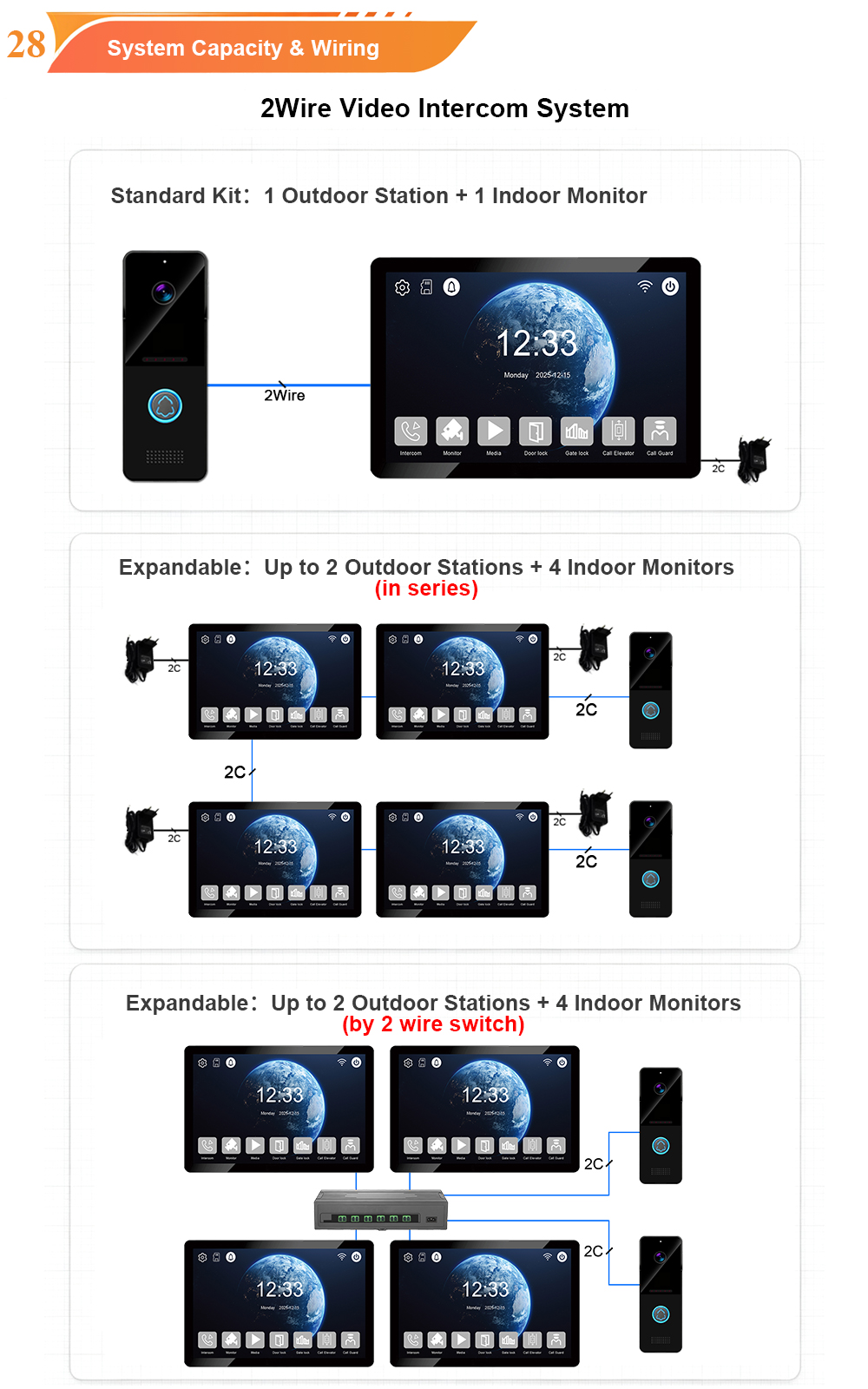
- Does your building have existing wiring that can be reused with a 2-wire IP retrofit?
- Do you have network infrastructure for IP-based systems?
- Are there elevators that need integration?
- Do you have front desk staff who will manage visitor interactions?
Step 3: Assess Scalability Requirements
How many users will the system need to support?
| System | Maximum Capacity |
|---|---|
| DoorBird D31x | Up to 1,000 units |
| DoorBird (larger systems) | Up to 3,000 digital display entries |
| IP-based systems | Hundreds to thousands of units |
Step 4: Choose Between Cloud-Based and On-Premise
| Factor | Cloud-Based | On-Premise |
|---|---|---|
| Management | Remote, from anywhere | Local, on-site |
| Updates | Automatic | Manual |
| Cost | Lower upfront, subscription-based | Higher upfront, no subscription |
| Best for | Multi-site portfolios | Single-site with IT staff |
Cloud-based systems like Swiftlane offer “a secure cloud dashboard that is available from anywhere… used to manage all users, permissions, and access rules”.
Step 5: Check Integration Capabilities
Ask your vendor:
- Does the system support SIP for integration with VoIP telephony?
- Is there an open API for custom integrations?
- Does it integrate with elevator control systems?
- Can it connect with existing access control and CCTV?
Frequently Asked Questions
What is a mixed-use building intercom system?
A mixed-use building intercom system is a unified access control solution that manages entry for multiple user types—residents, office workers, retail staff, visitors, and delivery personnel—across different areas of a building that serves residential, commercial, and sometimes hospitality purposes.
Why can’t I just use separate systems for residential and commercial access?
Separate systems create security gaps between them, require multiple credentials for users who need access to different areas, increase management complexity, and often cost more in the long run through duplicate maintenance contracts.
Can a single intercom system really handle both residents and businesses?
Yes. Modern IP video intercoms are designed for exactly this purpose. They support large directories with separate sections for residential and commercial tenants, multiple access methods for different user types, and time-based permissions to restrict access to business hours when needed.
How does elevator integration work in a mixed-use building?
Elevator integration ensures visitors and users can only access authorized floors. When a resident grants access to a visitor, the system can send the elevator to the lobby and restrict the visitor to the resident’s floor only. Office workers can access only their office floors; retail staff can access only retail areas.
What about package deliveries in a mixed-use building?
Unified intercom systems can integrate with package rooms. Couriers receive temporary QR codes or PINs to access the package room, record deliveries, and notify residents automatically. This reduces theft and missed deliveries.
Can I retrofit a mixed-use building without rewiring?
Yes. Many mixed-use buildings can be upgraded using 2-wire IP retrofits that reuse existing cabling. This saves 40–60% on labor and material costs compared to full rewiring, with installation taking days rather than weeks.
Do residents and businesses use the same app?
Not necessarily. Mobile-first systems allow different user types to use the same app with different permissions. Residents see residential features; office workers see commercial features; property managers see administrative controls.
What’s the ROI of upgrading to a unified mixed-use system?
Properties implementing unified systems typically see reduced operational costs through centralized management, fewer security incidents through better access control, improved tenant satisfaction through modern amenities, and higher property values.
Conclusion
Mixed-use buildings are the future of urban development—and they require access control solutions designed for their unique complexity.
A unified video intercom system delivers:
| Challenge | Solution |
|---|---|
| Multiple user types | One system, different permissions |
| Varying security needs | Time-based and location-based access rules |
| Stakeholder coordination | Centralized cloud management |
| Fragmented systems | Unified platform with open API integration |
| Complex directories | Touchscreen with separate residential/commercial sections |
| Elevator access | Floor-by-floor restrictions |
| Package deliveries | Package room integration with automated notifications |
| Vehicle access | License plate and Bluetooth readers |
The market is moving decisively toward unified IP-based solutions. As 2N notes, mixed-use projects “can be tricky as they combine both commercial and residential use cases in one premise”—but with the right technology, they don’t have to be.
Whether you’re developing a new mixed-use tower or retrofitting an existing property, the right video intercom system can transform how your building manages access—delivering better security, smoother operations, and happier tenants across every part of your property.
Ready to unify access across your mixed-use building? Start by mapping your user types, assessing your infrastructure, and choosing a solution that supports multiple access methods, elevator integration, and centralized management.
This guide is brought to you by insights from leading intercom technology providers and real-world mixed-use projects—helping property owners and managers make informed decisions for their buildings.

About the Author: S & Y Internet Technology Inc.
S & Y Internet Technology Inc. is a professional installation and repair service provider based in Flushing, New York. Our expert team provides door-to-door installation and maintenance within a 100 km radius, ensuring quick response and high-quality results for every project — whether residential, commercial, or specialized.

Install & Repair Services
You May Also Interest
-
RFID vs QR Code vs Mobile App: Comparing Access Methods for Residential Buildings
Choosing the right access method for your apartment building or gated community is a decision that affects security, convenience, cost, and resident satisfaction. RFID cards, QR codes, and mobile apps each have distinct strengths and weaknesses. This guide compares them side by side—so you can make an informed choice for your next project. In modern…
-
Tuya vs Smart Life: Which App Is Better for Your Video Door Phone?
A practical comparison to help you choose the right app for your smart intercom system If you’ve recently purchased a FARHD video door phone, you’ve probably noticed that the product documentation mentions two apps: Tuya Smart and Smart Life. This immediately raises a common question: which one should you actually use? Are they different? Does…
-
Touch Screen vs Non-Touch Video Intercom Monitors: Which Is Better for Residents?
When specifying a video intercom system for an apartment building, villa, or residential community, one question often divides decision-makers: should the indoor monitor have a touch screen or physical buttons? Both options have passionate advocates. Both have real advantages. And both can be the wrong choice if they don’t match the needs of the residents…
-
How to Upgrade an Old Apartment Intercom to IP Without Rewiring: Step-by-Step
Upgrading an old apartment intercom to a modern IP system no longer requires tearing down walls, replacing every cable, or disrupting residents for weeks. With the right retrofit technology, you can deliver full IP functionality—video calling, mobile access, remote management—using the existing 2-wire cabling already inside your building. This step-by-step guide shows you how. Many…